Ultimate Rivals League, Team Setup, and Cup Tactics
Ultimate Rivals League uses your collected footballers for PvP and PvE competition. Its team editor, three-way tactic cycle and cup bracket require different decisions from ordinary stadium kicks.
Setting Up Attack and Defence Teams
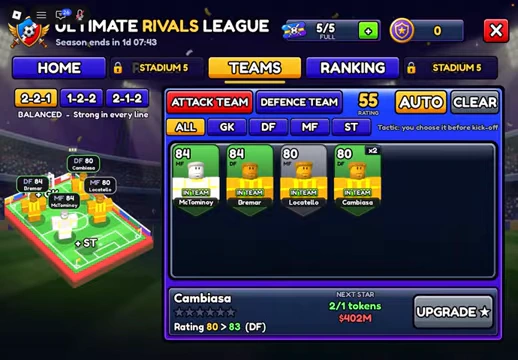
Released following an earlier CUPS + RANKED lobby countdown, the Ultimate Rivals League menu organizes competitive play across five top tabs: HOME, RIVALS, TEAMS, RANKING, and SHOP. Opening the TEAMS tab lets you configure two separate five-player lineups labeled ATTACK TEAM and DEFENCE TEAM. You can switch between 2-2-1, 1-2-2, and 2-1-2 formations, filter your footballer list by ALL, GK, DF, MF, or ST roles, and use the AUTO or CLEAR buttons to populate or reset your pitch slots.
The TEAMS interface also displays individual footballer ratings and star upgrade requirements. In one recorded frame, selecting Cambiasa shows a Next Star panel listing 2/1 tokens alongside a $402M cost and a rating preview from 80 to 83. Because the recording does not complete that transaction, treat the $402M price and token ratio as a single card snapshot rather than a universal upgrade table.
Conference Cup Matchups and the Tactic Cycle
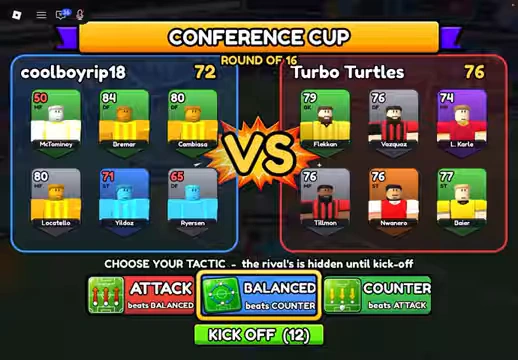
Entering a tournament match like the Conference Cup Round of 16 takes you to a pre-match screen comparing both squads. One recorded matchup displays a player team overall of 72 against an opponent overall of 76 while a KICKOFF countdown ticks at 12. Before the clock expires, you must choose one of three match tactics that follow an explicit on-screen counter cycle: ATTACK beats BALANCED, BALANCED beats COUNTER, and COUNTER beats ATTACK.
Crucially, the pre-match interface keeps your rival's chosen tactic hidden until kickoff begins. Because you cannot inspect the opponent's selection in advance and overall team ratings alone do not guarantee a win, there is no deterministic trick for countering a hidden rival prior to kickoff. Pick your tactic before the countdown reaches zero and focus on upgrading your lineup overalls inside the TEAMS tab between runs.
Match Progression Versus Paid Controls
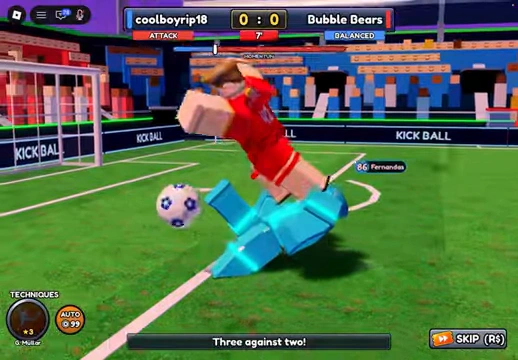
Once kickoff starts, the match simulates automatically while the top display tracks the live score, active tactics, and match minute. Along the bottom of the pitch view, a TECHNIQUES bar displays player-linked boost icons, such as a recorded G. Muller card carrying a +3 indicator.
Keep standard automated match progression distinct from the optional paid buttons shown on the match interface. Next to the technique cards, the recorded HUD displays an Auto 99 control with a Robux icon alongside a paid R$ SKIP button. Neither of these convenience buttons is free, so let the match clock run naturally unless you explicitly intend to spend Robux.
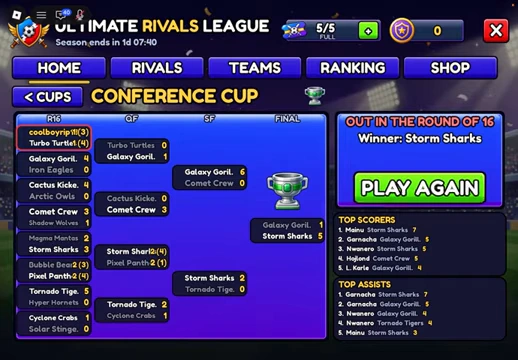
Cup Eliminations and Playing Again
Losing a tournament match ends your current bracket run and returns you to the cup overview screen. In recorded Conference Cup footage, an elimination displays the status message OUT IN THE ROUND OF 16 alongside a green PLAY AGAIN button.
While the upper league bar displays a 5/5 resource counter and a 0 currency readout during that bracket view, available footage does not establish ticket refill timers, entry fees, or cup victory payouts. Avoid assuming fixed prize tables until you view the live prompts in your own bracket. Continue training Shot Power and rolling higher-rarity footballers via the First Kick guide to strengthen your squad for future cup attempts.